AI worksheet maker with answer keys
Describe the skill and who it is for. Get one to three student pages, a matching answer key for each, and one PDF to print.
Make a worksheet with its answer keyMost worksheet generators give you text. Most worksheet libraries give you the page someone else needed. TeachFigs makes the page you need this week, with the picture on it, and the answer key that goes with it. It works for any subject: phonics and sight words, maps and communities, fractions and place value, a science diagram, or vocabulary in another language.
Open the creator, choose Worksheet, and describe the activity in a sentence or two: the topic, what students should do, and anything the page must include. Then choose an age range or an approximate US grade from Pre-K through 12th grade, set the challenge to Support, Standard, or Stretch, and pick one, two, or three student pages. TeachFigs plans each page, draws the student version, and then fills in a copy of the same page as the answer key, so the key matches the page your students see.
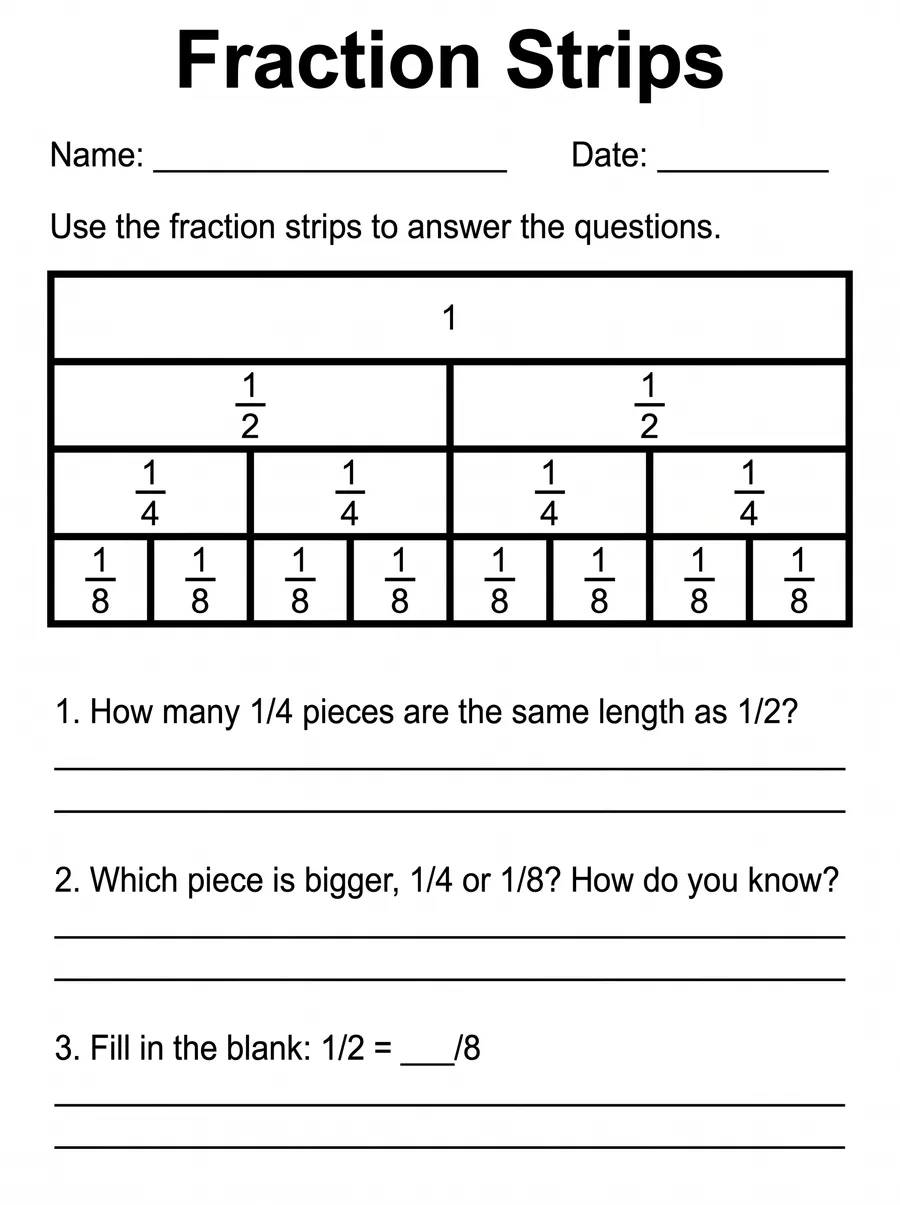
You download one letter-size PDF: the student pages first, then the answer keys. Print the whole file, or only the pages you want. The three examples below are real pages from this workflow: a grade 2 map skills page, a grade 3 fraction strips page, and a grade 1 short a phonics page. Each is shown with its key.
Check every page before you share it. Image models can misspell a word, draw a part in the wrong place, or write an answer that does not match the picture. Read each label, count what should be counted, and make sure the key answers the questions that are actually printed. If something is off, change your description and make the worksheet again. Choose Support for plainer language, cues and smaller steps, Standard for grade-level practice, and Stretch for questions that ask students to reason and explain.
TeachFigs needs no student data. You describe the lesson, not the learner, so leave student names out of your prompt. Classroom teachers, special education and ESL teachers, tutors, and homeschool families use the same steps, from preschool through high school. Adult learners and college courses work too.
The student page and its key, side by side
The key is the same page with the answers written in: the three map parts beside their numbers and both written answers. Check that the key's answers match what the picture shows. Here the school is directly north of the lake, so north is right.

Prompt
Turn this student worksheet into its teacher answer key. Keep everything else identical: the same title, diagram, questions, numbering, lines and layout. Make only these changes: - On the blank after "Name:", write "Answer Key" in large, heavy lettering. Leave the title, the Date blank and everything else at the top exactly as they are. - Beside each numbered circle, on the side away from its arrow, write its answer: 1 → "compass rose"; 2 → "map key"; 3 → "scale". - On the ruled lines below each question, starting on the first line and leaving the question's words as printed, write its answer in clear print: 1. "North (the school is above the lake)." 2. "A park." Keep every answer inside its space. Add nothing else.
Prompt
A printable student worksheet page laid out as a flat digital document: a pure white background, crisp black text, and no paper texture, shadows or page border; portrait, with even margins. It is for young children: large, simple lettering and roomy spacing. Layout, top to bottom: 1. Title, large and bold: "Parts of a Map" 2. One line with "Name: ____________" on the left and "Date: ________" on the right 3. Instructions: "Look at the map. Write the word for each number. Use the word bank." 4. The diagram described below 5. A box containing "Word bank: compass rose, map key, scale" 6. The questions, each followed by space to answer (two or three ruled lines for a written answer): "1. Which direction is the school from the lake?" "2. What does the tree symbol in the map key stand for?" Diagram: A simple, friendly map of a small town for second graders, drawn from above in black outline. In the top half of the map: a school with a flag and two houses. In the bottom half, directly below the school: a round lake with wavy lines. On the left side: a park with round trees. One street runs across the middle of the map. In the top right corner, a compass rose showing N, E, S and W. In the bottom left corner, a small map key box with three symbols, each with a short word beside it: a house symbol and "House", a tree symbol and "Park", a wavy-lines symbol and "Water". Along the bottom right edge, a short scale bar with "0" and "100 steps". Numbered callouts: put each number in a small circle outside the drawing, with one straight arrow whose tip touches its part. Each number appears exactly once, with one arrow: 1 → compass rose; 2 → map key; 3 → scale. Show only the numbers; never write these part names on the page. Draw only what the diagram description says. Print only the quoted text and the callout numbers; do not print these notes or any other words.Example figures
Prompt
A printable student worksheet page laid out as a flat digital document: a pure white background, crisp black text, and no paper texture, shadows or page border; portrait, with even margins. It is for students aged 9-11: clear, readable lettering. Layout, top to bottom: 1. Title, large and bold: "Fraction Strips" 2. One line with "Name: ____________" on the left and "Date: ________" on the right 3. Instructions: "Use the fraction strips to answer the questions." 4. The diagram described below 5. The questions, each followed by space to answer (two or three ruled lines for a written answer): "1. How many 1/4 pieces are the same length as 1/2?" "2. Which piece is bigger, 1/4 or 1/8? How do you know?" "3. Fill in the blank: 1/2 = ___/8" Diagram: Four horizontal fraction strips stacked one above another, all exactly the same length and lined up at the left and right ends, thick black outlines, no shading. Top strip: one whole piece labeled "1". Second strip: 2 equal pieces, each labeled "1/2". Third strip: 4 equal pieces, each labeled "1/4". Fourth strip: 8 equal pieces, each labeled "1/8". Draw only what the diagram description says. Print only the quoted text; do not print these notes or any other words.
Prompt
Turn this student worksheet into its teacher answer key. Keep everything else identical: the same title, diagram, questions, numbering, lines and layout. Make only these changes: - On the blank after "Name:", write "Answer Key" in large, heavy lettering. Leave the title, the Date blank and everything else at the top exactly as they are. - On the ruled lines below each question, starting on the first line and leaving the question's words as printed, write its answer in clear print: 1. "2" 2. "1/4. The strip is cut into fewer pieces, so each piece is bigger." 3. "4" Keep every answer inside its space. Add nothing else.
Prompt
A printable student worksheet page laid out as a flat digital document: a pure white background, crisp black text, and no paper texture, shadows or page border; portrait, with even margins. It is for young children: large, simple lettering and roomy spacing. Layout, top to bottom: 1. Title, large and bold: "Short a Words" 2. One line with "Name: ____________" on the left and "Date: ________" on the right 3. Instructions: "Say the name of each picture. Write the word on the line. Use the word bank." 4. The diagram described below 5. A box containing "Word bank: cat, hat, map, bat" 6. The questions, each followed by space to answer (two or three ruled lines for a written answer): "1. Which two words rhyme with cat?" Diagram: Four simple black outline pictures in a row, evenly spaced, each with a blank writing line below it: a cat sitting, a sun hat, a folded paper map, and a wooden baseball bat. Numbered callouts: put each number in a small circle outside the drawing, with one straight arrow whose tip touches its part. Each number appears exactly once, with one arrow: 1 → cat; 2 → hat; 3 → map; 4 → bat. Show only the numbers; never write these part names on the page. Draw only what the diagram description says. Print only the quoted text and the callout numbers; do not print these notes or any other words.
Prompt
Turn this student worksheet into its teacher answer key. Keep everything else identical: the same title, diagram, questions, numbering, lines and layout. Make only these changes: - On the blank after "Name:", write "Answer Key" in large, heavy lettering. Leave the title, the Date blank and everything else at the top exactly as they are. - Beside each numbered circle, on the side away from its arrow, write its answer: 1 → "cat"; 2 → "hat"; 3 → "map"; 4 → "bat". - On the ruled lines below each question, starting on the first line and leaving the question's words as printed, write its answer in clear print: 1. "hat and bat" Keep every answer inside its space. Add nothing else.How it works
Describe the activity
Choose Worksheet in the creator. Say what students practice and what the page must show, for example: label the parts of a town map with a word bank, a direction question and a map-key question.
Choose the age, challenge and pages
Pick an age range or an approximate US grade, Support, Standard or Stretch, and one to three student pages. The creator shows the credit total before you start.
Check, then print one PDF
Read each student page and its key. Download one letter-size PDF with the student pages first and the answer keys after them.
Pricing
- 10 free credits once at signup.
- Starter: $8/month for 30 credits.
- Classroom: $24/month for 100 credits.
- Credit pack: $4 for 15 credits.
- Each student page with its answer key uses 2 credits, or 4 at Ultra quality.
- Monthly credits reset; pack credits do not expire. Check current prices at checkout.
Does every worksheet come with an answer key?
Yes. Each student page gets a matching answer key made from the same page, so the layout and questions match. Both are in one PDF: student pages first, then keys. Check that each answer is correct before you use the key for grading.
What subjects and grades does it work for?
Any subject you can describe: reading and phonics, math, social studies, science, world languages, health, art and music, and life skills. Choose an age range or an approximate US grade from Pre-K through 12th grade, or an adult audience.
Can I make an easier or harder version of the same worksheet?
Yes. Make the worksheet again with the same description and a different challenge level. Support uses plainer language, cues and smaller steps (two or three short tasks for the youngest ages); Stretch asks students to reason and explain. This is useful for small groups, intervention, and students who finish early.
Do I need to enter anything about my students?
No. TeachFigs never asks for student names, rosters, or work. Describe the lesson and the age group only, and keep student names out of your prompt.
Can I print it at home or school?
Yes. The download is a letter-size PDF that prints on a home or school printer. You can print every page or choose only the student pages.