AI lesson visual maker for teachers
The picture you could not find: describe what you are teaching and who it is for, and use it on a slide, a handout, or the board.
Make a lesson visualTeachFigs is an AI lesson visual maker for teachers, tutors, and homeschool families from preschool through college. Describe what you are teaching, the age or grade level, and the labels you need, then generate a custom visual for a slide, handout, poster, or study guide in any subject — with no student accounts or student data required. Export visuals as PNG, JPEG, or WebP (1K, 2K, or 4K), auto-traced SVG, or a 300 DPI upscaled PNG.
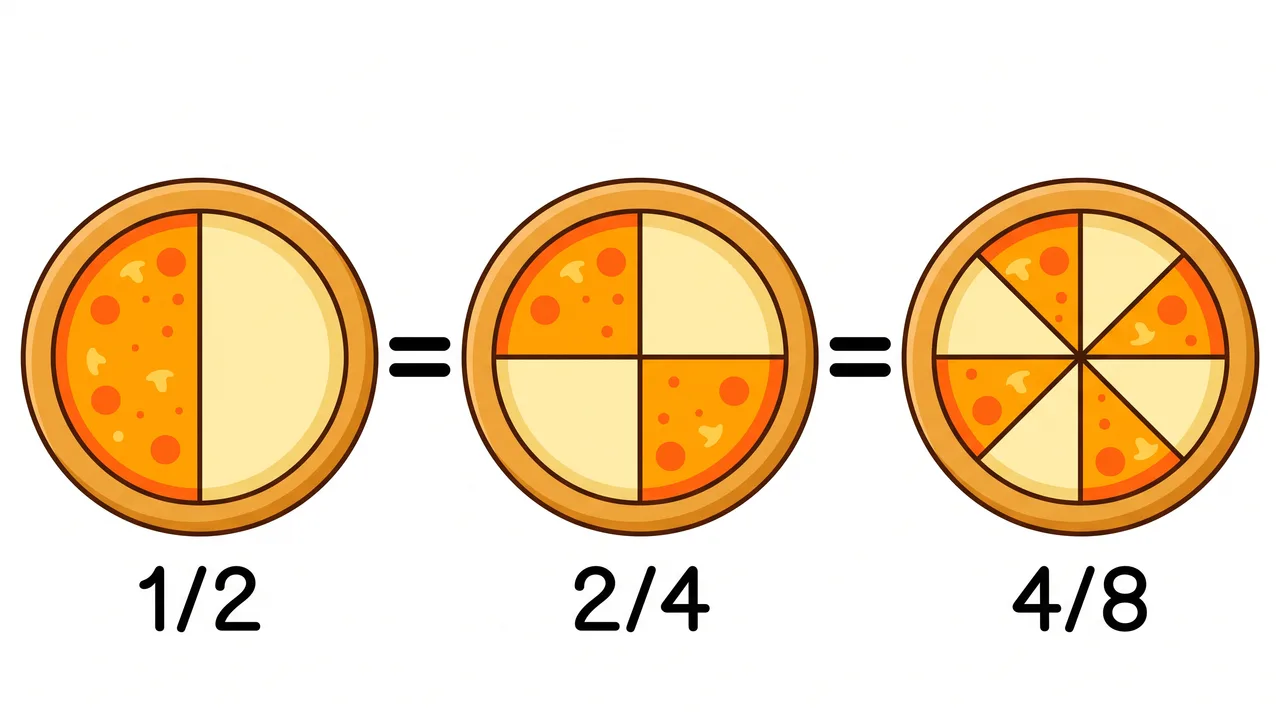
Start with the teaching point, not decoration. The four pictures below were made this way. "Equivalent fractions with pizza slices for a grade 3 math lesson" became three pizzas showing 1/2 = 2/4 = 4/8. A busy street of community helpers for kindergarten social studies became a calmer scene with four labeled helpers after one edit. Daily life along the Nile became a labeled grade 6 history picture. A butterfly life cycle shows the stages for an elementary science lesson. The first three captions include the prompt that made them.
Choose a style for your students: K-12 textbook for bright, friendly pictures, Illustrated or Comic for a story feel, Worksheet or Coloring book for black-and-white printing, Diagram or Concept map for structure, and Higher ed for older students. Say the grade in your description: it changes how much detail and how many words the picture has. New accounts start free with 10 credits once at signup (no credit card); each 1K or 2K visual or edit uses 1 credit, and 4K uses 2 credits.
Generated images are drafts. Check facts, spelling, labels, arrows, and counts against your lesson before you share them. Revise the prompt, or edit the image with a short instruction such as "keep only four helpers and add name labels", if it does not show what you need.
Generated lesson visuals are drafts. Check facts, spelling, labels, arrows, and counts before sharing with students. TeachFigs requires no student accounts or student data.
Example figures
Prompt
K-12 Textbook style, 16:9. Prompt: Equivalent fractions with pizza slices for a grade 3 math lesson. Three flat, simple cartoon pizzas in one row on a plain white background, all the same size, with no shadows, steam or extra pizzas. Left pizza: cut into 2 equal slices; 1 slice is bright orange and 1 slice is pale yellow; the label "1/2" below it. Middle pizza: cut into 4 equal slices; 2 slices are bright orange and 2 are pale yellow; the label "2/4" below it. Right pizza: cut into 8 equal slices; 4 slices are bright orange and 4 are pale yellow; the label "4/8" below it. A large equals sign between each pair of pizzas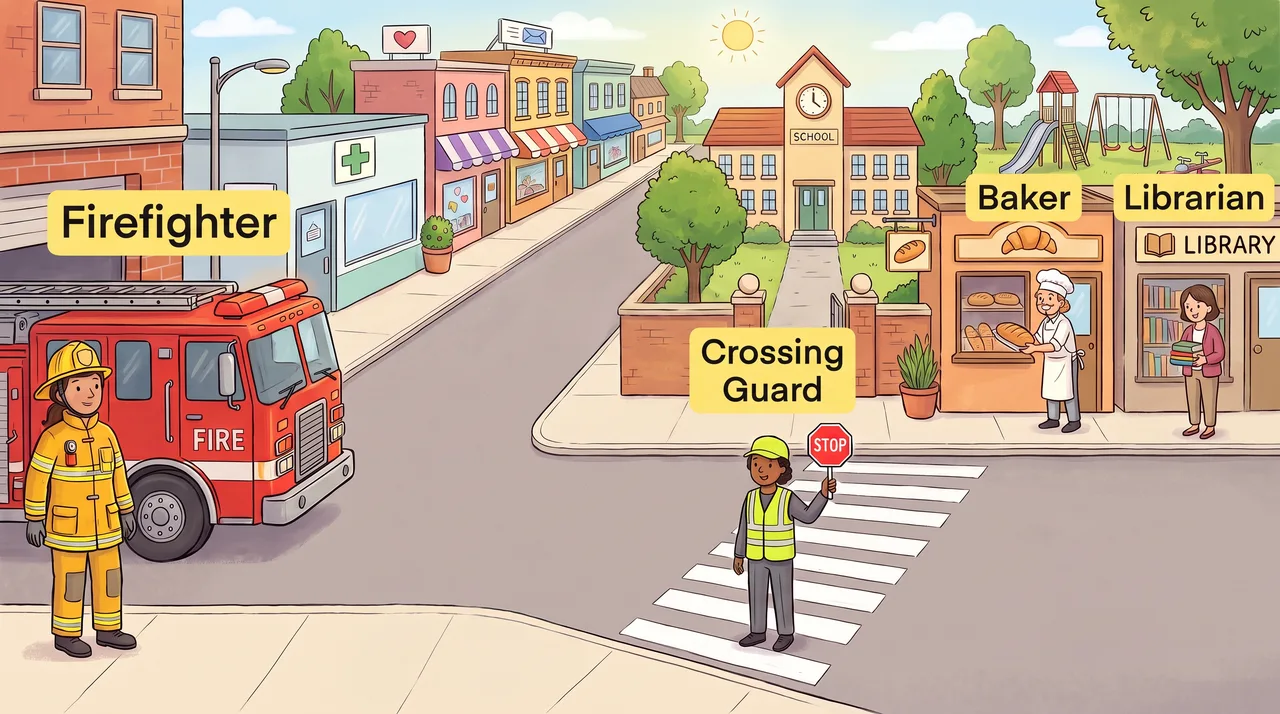
Prompt
K-12 Textbook style, 16:9. Prompt: A busy, colorful neighborhood street scene for a kindergarten social studies lesson on community helpers. Eight community helpers at work along one street: a firefighter beside a red fire truck, a nurse outside a clinic, a mail carrier with a mailbag at a mailbox, a teacher with a small group of children by a school, a crossing guard at a crosswalk, a baker at a bakery window, a librarian holding books outside a library, and a sanitation worker beside a recycling truck. The helpers are a mix of women and men of different races and ages, with no stereotypes. Many small background details: shops, parked cars, trees, a playground, birds, and signs without words. Edit instruction: Keep only four helpers, add name labels, make it calmer for kindergarten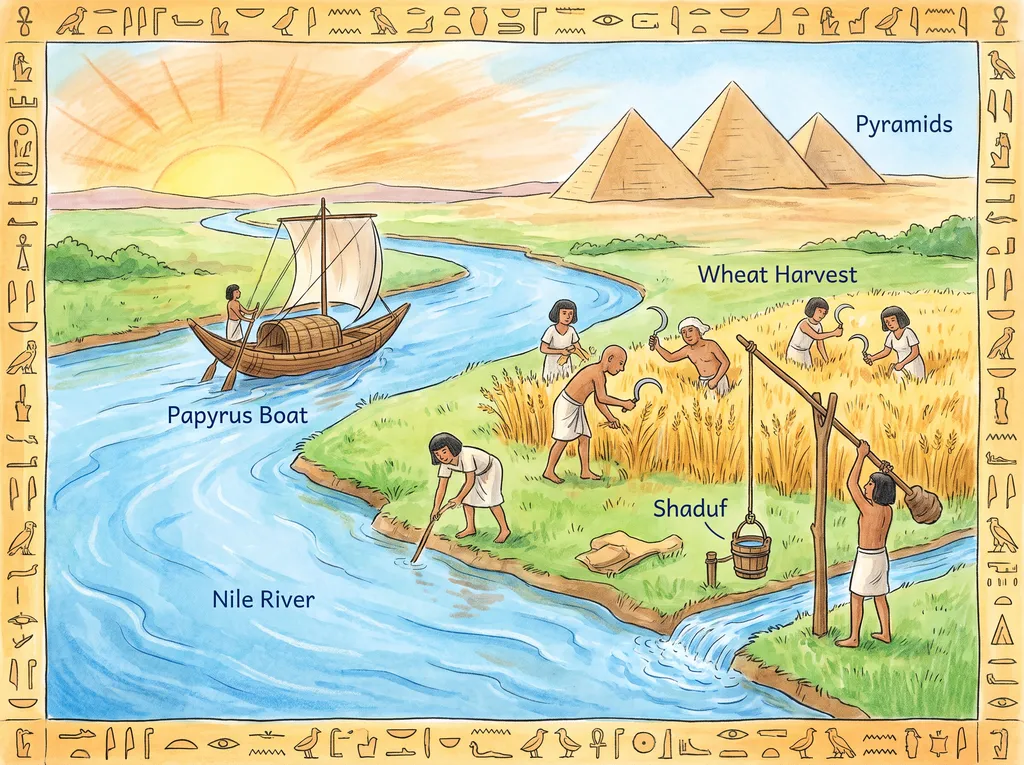
Prompt
K-12 Textbook style, 4:3. Prompt: Daily life along the Nile in ancient Egypt for a grade 6 history lesson: farmers harvesting wheat, a reed boat on the river, a shaduf lifting water, and pyramids in the distance. Labels: Nile River, Shaduf, Papyrus Boat, Wheat Harvest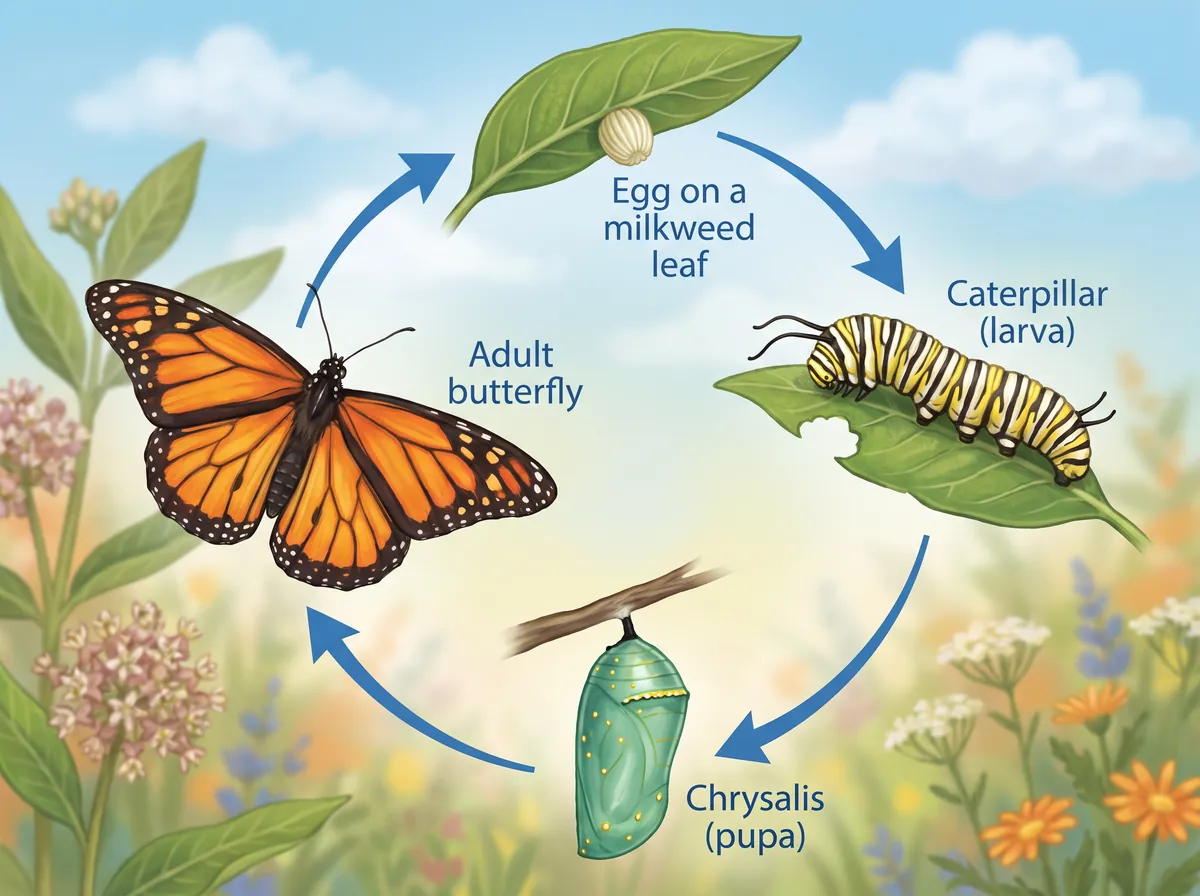
Prompt
The life cycle of a monarch butterfly for an elementary science lesson, arranged in a circle with arrows: Egg on a milkweed leaf, Caterpillar (larva), Chrysalis (pupa) and Adult butterfly. One clear label per stage, each appearing exactly onceHow it works
Describe the teaching point
Name the topic, audience, and parts or sequence students need to see.
Choose a style and generate
Try an illustrated, textbook, diagram, or other education-focused style.
Review and use the image
Check content and labels, revise if needed, and export the image for your lesson.
What can I make for a lesson with TeachFigs?
Any picture you can describe: a math model, a story scene, a map, a historical setting, a labeled diagram, a feelings chart, or a science process. Name the parts, labels, and arrows your students should see, plus the age or grade.
Is TeachFigs free to start?
Yes. New accounts get 10 credits once at signup with high-resolution export and no credit card. Each 1K or 2K visual or edit uses 1 credit, and 4K uses 2 credits. Starter is $8/month for 30 credits, Classroom is $24/month for 100 credits, and a credit pack is $4 for 15 non-expiring credits.
What formats can I export for slides, handouts, or posters?
Download lesson visuals as PNG, JPEG, or WebP at 1K, 2K, or 4K, convert to an auto-traced SVG, or upscale to a 300 DPI PNG (2 credits) for classroom posters. Check labels, spelling, and facts before presenting or printing.
Do I need student accounts or student data?
No. TeachFigs requires no student accounts, rosters, or student information. Describe the lesson topic and grade level only.
What if the generated visual has an error?
Treat every output as a draft. Request a targeted image edit (such as simplifying labels or removing extra items) or revise the description and regenerate, then check the new result against a trusted source before teaching from it.